Apple Watch golf scorecard without GPS: how it works and who it's for
Yes, you can keep score on an Apple Watch without GPS. A scorecard-only app skips distances and course maps: you tap in strokes, putts, and penalties for each hole, and it keeps your total and score vs par. Golf Caddie works this way, with no account and no course download, so it scores even without signal.
| Golf Caddie at a glance | |
|---|---|
| GPS | None. You enter scores yourself. |
| Account | None. Rounds live in your iCloud account. |
| Works without cell signal | Yes |
| Apple Watch app (scoring and club distances) | Pro: one-time $2.99 (US price), 14-day free trial, no credit card |
| Siri and Lock Screen scoring | Pro, same one-time unlock |
| Club distances on iPhone | Free |
| iPhone scorecard | Free, unlimited rounds |
| Requires | iPhone with iOS 17.6 or later; Apple Watch optional |
Can you keep score on an Apple Watch without GPS?
Yes. Scorecard-only apps don’t need GPS, because they never measure distance. You record each hole yourself: strokes, putts, and penalties. The app adds them up and shows your score against par. GPS apps often include a scorecard too, but they’re built around distances, course maps, and shot tracking.
On the Watch, that means a small screen with a few buttons per hole and nothing to wait for. There’s no course to download and no satellite fix to find before the first tee. You start a round and tap.
Why would you skip GPS on your Apple Watch?
Most golfers skip GPS for battery, speed, or simplicity. A GPS app tracks your location all round, which costs battery. It also needs the right course map, and often an account and a subscription. If you only want an accurate score, a scorecard-only app is faster to start and has less to go wrong.
Common reasons:
- Battery. Tracking your location for a whole round uses battery. Golf Caddie doesn’t run GPS, so scoring stays light. More in Apple Watch battery for 18 holes.
- No signal or no course map. A scorecard-only app works the same on a municipal nine, a course abroad, or a field with no reception.
- Fewer taps, less phone time. You add a stroke and move on. Nothing else on the screen competes for your attention.
- Privacy. No location history and, with Golf Caddie, no account.
What do you give up without GPS?
You give up distances: yardages to the green and hazards, shot tracking, course maps, and the advanced stats that come from knowing where every shot landed. If you use those to choose clubs or analyze your game shot by shot, a GPS app or sensor system does more. A scorecard-only app is for golfers who mostly want the score.
There are simple ways to get yardages without GPS on your wrist:
- Course markers. Most courses mark 100, 150, and 200 yards with posts, plates, or sprinkler heads.
- A laser rangefinder. It measures to the flag itself and works alongside any scorecard app.
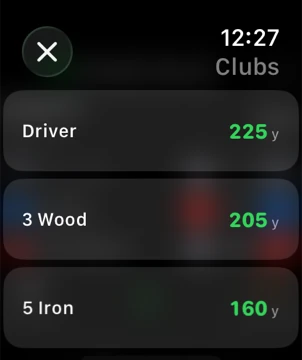
- Know your own distances. Golf Caddie keeps a club distances cheat sheet on the iPhone (free) and on the Apple Watch (Pro), so once you know the yardage, you know the club.
How do you score a hole on your Apple Watch?
Open the app, add strokes, putts, and penalties with the + and – buttons, then swipe to the next hole. In Golf Caddie that’s a few taps per hole. Your total and score vs par update as you go, and the Watch, iPhone, and Lock Screen Live Activity stay in sync.
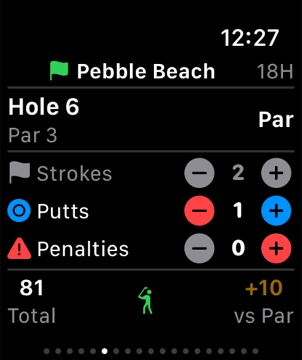
A round in Golf Caddie, step by step:
- Start a round. Use Quick Start on the Watch or iPhone: Front 9, Back 9, or 18 holes, every hole set to par 4. Or start on the iPhone with the course name and your own pars.
- Score each shot. Tap + under strokes for each shot before the green, then + under putts once you’re on it. Add a penalty for a lost ball, out of bounds, or water.
- Move on. Swipe left or right to change holes. After your first putt, strokes lock so a stray tap can’t change them.
- Check your clubs. Your club distances are in the totals row on the Watch.
- Finish. End the round on the last hole (on the Watch, the page after it). The iPhone has the full scorecard and a shareable card view.
With Pro you can also score with your voice (“Add a putt in Golf Caddie”) or from the iPhone Lock Screen without unlocking. See every phrase in keep score in golf with Siri.
Does a scorecard-only app work without cell signal?
Yes. Scoring doesn’t need the internet: there’s no course data to download and nothing to look up mid-round. Golf Caddie keeps your Watch and iPhone in sync over Bluetooth, so poor reception on the course doesn’t matter. Your rounds are saved to iCloud whenever you’re back online.
How much does it cost to score golf on an Apple Watch?
It depends on the app. Many GPS golf apps put Watch features in a yearly subscription. Golf Caddie’s iPhone scorecard is free with unlimited rounds, and the Apple Watch app is part of Pro, a one-time $2.99 (US price) after a 14-day free trial. There’s no subscription and no credit card for the trial.
Nothing to cancel. When the trial ends, everything free stays free. Pro also includes Siri voice scoring and the Lock Screen Live Activity. See what’s free and what’s Pro, or read why there’s no subscription.
Is a scorecard-only app right for you?
A scorecard-only app is right for you if the number at the end of the round matters more than yardages on your wrist. Choose a GPS app or sensor system if you rely on distances to pick clubs or want shot-by-shot stats. Plenty of golfers pair a scorecard app with a rangefinder to get both. To see two popular GPS apps side by side with Golf Caddie, read Golf Caddie vs TheGrint and Golf Caddie vs 18Birdies.
| You want… | Best fit |
|---|---|
| An accurate score with as few taps as possible | Scorecard-only app |
| To score on any course, with or without signal | Scorecard-only app |
| No account and no location tracking | Scorecard-only app |
| Yardages to the green and hazards on your wrist | GPS app, or a rangefinder plus a scorecard app |
| Automatic shot tracking and strokes-gained stats | GPS app or a sensor system |
Frequently asked questions
Will a scorecard app drain my Apple Watch battery?
A scorecard-only app is lighter than a GPS app because it doesn’t track your location. Golf Caddie doesn’t run GPS at all. Its optional Apple Health setting has two modes: Save Summary logs the round when you end it, with no battery impact, while Full Session runs a live Watch workout for heart rate and calories, which uses the most battery.
Do I need my iPhone on the course?
Keep your iPhone in your bag or cart. With Golf Caddie, the Watch and iPhone score the same round and sync over Bluetooth as you play. With Pro, the round also shows on your iPhone Lock Screen.
Can I use a rangefinder or GPS watch alongside it?
Yes. Golf Caddie only keeps score, so it doesn’t compete with a laser rangefinder or another device for distances. Many golfers use a rangefinder for yardages and their Apple Watch for the scorecard.
Does it work on any course?
Yes. There’s no course database to download, so it works on any course in any country. Use Quick Start (par 4 on every hole) or set the par for each hole yourself.
Do I need to create an account?
No. Golf Caddie has no sign-up. Rounds are stored in your own iCloud account, and the developer collects no personal data. See the privacy policy.