Keep score in golf with Siri: the exact phrases that work
Siri can keep score in golf with Golf Caddie Pro. Say “Add a stroke in Golf Caddie,” “Add a putt in Golf Caddie,” or “Next hole in Golf Caddie,” and Siri updates your scorecard in the background, on iPhone or Apple Watch. Ask “What is my round score in Golf Caddie?” to hear your total and score against par.
| Say this | What it does | Also accepts |
|---|---|---|
| “Start a quick round in Golf Caddie” | Starts an 18-hole Quick Start round | “Quick start in Golf Caddie” |
| “Start a back 9 holes round in Golf Caddie” | Starts a nine-hole round on holes 10–18 | “Start a front 9 holes round…” for holes 1–9 |
| “Add a stroke in Golf Caddie” | Adds a stroke on the current hole | “Add stroke…”, “Log a stroke…” |
| “Add a putt in Golf Caddie” | Adds a putt on the current hole | “Log a putt…” |
| “Add a penalty in Golf Caddie” | Adds a penalty stroke on the current hole | “Log a penalty…” |
| “Next hole in Golf Caddie” | Moves to the next hole | “Go to next hole…” |
| “What hole am I on in Golf Caddie” | Tells you the hole, par, and your score so far | “Current hole…” |
| “What is my round score in Golf Caddie” | Tells you your total and score vs par | “What is my score…”, “My score…” |
| “What is my hole score in Golf Caddie” | Tells you the current hole’s score in golf terms | “Current hole score…” |
Can Siri keep score in golf?
Yes, with a scorecard app that supports Siri. Golf Caddie has 8 Siri commands that start rounds, add strokes, putts, and penalties, move to the next hole, and tell you your score. They work on iPhone and Apple Watch without opening the app. Siri scoring is part of Golf Caddie Pro, and it’s included in the free trial.
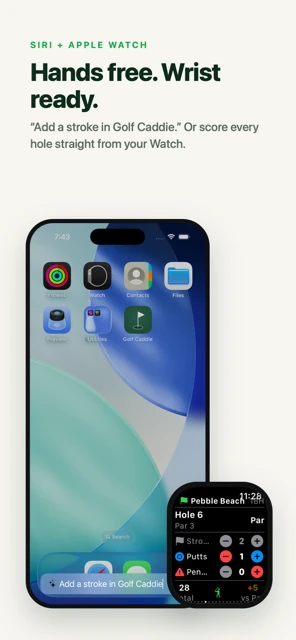
Every command needs “in Golf Caddie” at the end, so Siri knows which app to use. The table above lists each phrase exactly as the app understands it, with the variations it also accepts.
How do you start a round with Siri?
Say “Start a quick round in Golf Caddie” to start an 18-hole round with every hole set to par 4. For nine holes, say “Start a front 9 holes round in Golf Caddie” or “Start a back 9 holes round in Golf Caddie”. Siri confirms the round has started and wishes you good luck.
Quick Start rounds are named “Quick Round”. If you want the course name and exact pars from the first hole, start the round in the app instead, then use Siri for the scoring.
How do you add strokes, putts, and penalties by voice?
Say “Add a stroke in Golf Caddie” after each shot, “Add a putt in Golf Caddie” for each putt, and “Add a penalty in Golf Caddie” for a penalty stroke. Siri confirms each one with the running count, for example “Stroke added. Hole 4: 2 strokes.” Say “Next hole in Golf Caddie” when you walk off the green.
The replies follow the same pattern:
- Stroke: “Stroke added. Hole 4: 2 strokes.”
- Putt: “Putt added. Hole 4: 2 putts.”
- Penalty: “Penalty added.” followed by the hole and its penalty count.
- Next hole: “Moving to hole 5.” On the last hole, Siri tells you you’re already there.
As in the app, strokes on a hole lock once you’ve added a putt, so a stray “add a stroke” can’t change a finished hole.
How do you check your score with Siri?
Ask “What is my round score in Golf Caddie” for your total and where you stand against par, or “What is my hole score in Golf Caddie” for the current hole in golf terms like birdie or bogey. “What hole am I on in Golf Caddie” reads back the hole, its par, and what you’ve scored on it.
Example replies, in the format the app uses:
- Round score: “Quick Round: 13 total, 1 over par after 3 holes. Bogey.”
- Hole score: “Hole 3: Bogey. 5 total, par 4.”
- What hole: “Hole 4, par 4, 2 strokes, 1 putt, Birdie.”
Does Siri scoring work on Apple Watch?
Yes. The same commands work on Apple Watch, and your iPhone, Watch, and Lock Screen Live Activity stay in sync, so a stroke added by voice on your wrist shows up everywhere. Use Siri on the Watch the way you normally do. The Golf Caddie Watch app is part of Pro, like Siri scoring.
Siri works in the background on both devices, so you don’t need to open Golf Caddie or look at a screen to add a stroke. For the full Watch setup, see Apple Watch golf scorecard without GPS, and to make your watch last the round, Apple Watch battery for 18 holes.
When is voice faster than tapping?
Voice helps most when your hands are busy or your phone is in the bag: walking to the ball, wearing gloves, or riding in a cart. Say the command as you go and keep moving. Tapping is quicker when you’re already looking at the screen, so most golfers mix both. Your scorecard is the same either way.
Siri scoring, the Apple Watch app, and the Lock Screen Live Activity come with Golf Caddie Pro, a one-time $2.99 (US price) after a 14-day free trial. The iPhone scorecard is free. See what’s free and what’s Pro.
Frequently asked questions
Do I need to open the app first?
No. Siri updates your scorecard in the background, and the change shows up on your iPhone, Apple Watch, and Lock Screen Live Activity right away. You do need a round in progress; if there isn’t one, Siri tells you to start a round first.
Does Siri scoring work in the free version?
Siri scoring is part of Golf Caddie Pro, and it’s included in the free 14-day trial. Without Pro, Siri replies: “Siri shortcuts require Golf Caddie Pro. Upgrade in the Settings tab.”
Can I say it differently?
Each command accepts a few built-in variations, like “Log a stroke in Golf Caddie” or “My score in Golf Caddie.” Always include “in Golf Caddie” so Siri knows which app you mean.
Why did Siri say my strokes are locked?
Once a hole has putts, Golf Caddie locks its strokes so a stray command can’t change them. Siri replies “Strokes are locked on hole 4 because you already added putts.” To change strokes, set putts back to zero in the app first.