How to track putts in golf (and what the numbers tell you)
To track putts, count every stroke you make once your ball is on the putting green, and write that number next to your score for each hole. Strokes from the fringe or fairway don’t count as putts, even with a putter. After a few rounds, look at three-putts and putts on greens you hit in regulation.
| What to record per hole | Why it helps |
|---|---|
| Putts | Your basic putting number |
| Was the green hit in regulation? | Separates putting from short-game results |
| First-putt distance (rough) | Shows whether three-putts start with long lag putts |
| Three-putts | A simple count of where strokes leak on the green |
How do you track putts in golf?
Count each stroke you make with the ball on the putting green and record it per hole, alongside your score. That’s your putts for the hole. Add them up for putts per round. The habit takes seconds: when the ball drops, note the putts before you leave the green, so you don’t have to remember later.
On a paper card, use a small box or a second number in each hole’s square. In a scorecard app, putts usually have their own counter, so the app can total them for you.
Does a putt from the fringe count as a putt?
Not under the usual convention. A putt is a stroke made while your ball is on the putting green. A stroke from the fringe, collar, or fairway counts toward your score but not as a putt, even if you use your putter. What matters most is consistency: pick a rule and keep it every round.
This is also why “putts per round” can mislead. If you miss greens and putt from the fringe a lot, your putt count can look better than your putting is.
What should you record on each hole?
Record your putts, whether you hit the green in regulation, and roughly how far your first putt was. That’s enough to spot patterns. A green in regulation means your ball was on the green in two strokes fewer than par: one shot on a par 3, two on a par 4, three on a par 5.
A simple routine:
- Putts: count them before leaving the green.
- Green in regulation (GIR): yes or no.
- First-putt distance: a rough number of paces or feet.
- Three-putts: circle the hole on your card.
How do you read your putting numbers?
Look at putts on greens you hit in regulation and count your three-putts. Putts per round alone mixes putting with chipping: a good chip leaves a one-putt, which flatters your total. Putts on greens hit in regulation measure putting more fairly. Three-putts show where strokes leak.
After a few rounds, ask:
- Are most three-putts from long first putts? Practice lag putting, so long putts finish close.
- Are you missing short ones after a decent first putt? Practice short putts, inside a few feet.
- Do you one-putt a lot after chips? Your short game is saving strokes, and your putting may be fine.
Compare yourself with your own past rounds, not with tour averages. The trend over several rounds tells you more than any single number.
What does a putting record look like? A worked example
Here’s an example 18-hole putting record (made-up numbers, for illustration). It shows 34 putts, which looks ordinary. Split by greens in regulation, it tells a clearer story: 17 putts on 7 greens hit (about 2.4 per green), but only 17 putts on 11 greens missed, because chips left short putts.
| Hole | Green in regulation | Putts | First putt |
|---|---|---|---|
| 1 | Yes | 2 | 25 ft |
| 2 | No | 1 | 6 ft |
| 3 | Yes | 3 | 40 ft |
| 4 | No | 2 | 15 ft |
| 5 | No | 1 | 4 ft |
| 6 | Yes | 2 | 18 ft |
| 7 | No | 2 | 12 ft |
| 8 | Yes | 3 | 35 ft |
| 9 | No | 1 | 5 ft |
| 10 | No | 2 | 20 ft |
| 11 | Yes | 2 | 22 ft |
| 12 | No | 1 | 3 ft |
| 13 | No | 2 | 10 ft |
| 14 | Yes | 3 | 45 ft |
| 15 | No | 1 | 8 ft |
| 16 | Yes | 2 | 30 ft |
| 17 | No | 2 | 14 ft |
| 18 | No | 2 | 9 ft |
What this example card says:
- Three-putts: 3 (holes 3, 8, and 14), and every one started 35 feet or more away. The fix is lag putting from distance, not short putts.
- One-putts: 5, all after missed greens and all from 8 feet or less. The short game is saving strokes.
- Putts on greens hit: 17 in 7 greens. That’s the number to watch improve as lag putting gets better.
How do you track putts in Golf Caddie?
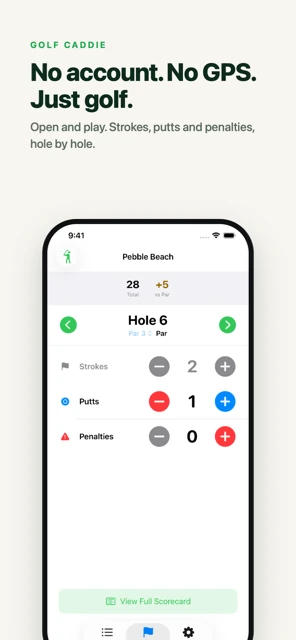
Tap + under putts each time you putt on a hole. Golf Caddie adds putts to strokes and penalties for the hole score and shows your total putts in the round summary. Once a hole has putts, strokes lock so a stray tap can’t change them. To edit strokes, set putts back to zero first.
More ways to log putts:
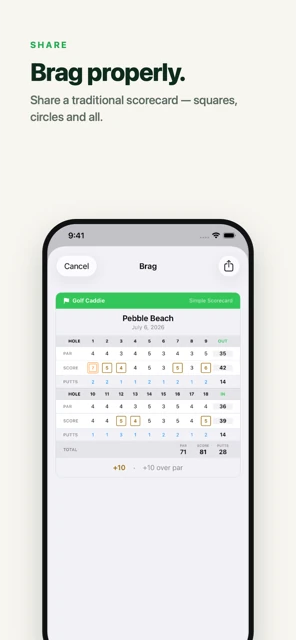
- The share card shows putts for every hole and the round total.
- Export your rounds: the spreadsheet has putts for every hole, so you can see trends across rounds in Numbers, Excel, or Google Sheets.
- With Pro: add putts from your Apple Watch, from the iPhone Lock Screen, or say “Add a putt in Golf Caddie” to Siri.
Golf Caddie doesn’t record first-putt distance or greens in regulation, so jot those on the card (or in your notes) if you want them. New to scoring? Start with how to keep score in golf.
Frequently asked questions
Does a tap-in count as a putt?
Yes. Every stroke on the green counts as a putt, including a two-inch tap-in. In stroke play under the Rules of Golf you have to hole out on every hole, so the tap-in also counts toward your score.
What about a conceded putt or a gimme?
In match play an opponent can concede your putt, and you don’t make that stroke. In stroke play there are no concessions: you hole out (see Rule 3.3). If your casual group allows gimmes, add the putt you would have taken, so your putting numbers stay honest.
Should I count a putt from the fringe?
Count it as a stroke, not a putt. The usual convention in golf stats is that a putt is a stroke made while the ball is on the putting green. Whatever you choose, use the same rule every round, or your numbers won’t compare.
Is it worth tracking first-putt distance?
Yes, roughly. Pacing it off or estimating in feet is enough. Many three-putts start with a long first putt, so knowing your first-putt distances tells you whether to practice lag putting or short putts.