Golf scorecard app without a subscription: what you get and what to check
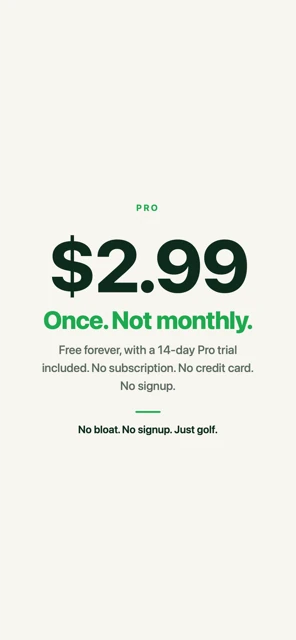
Yes. Golf Caddie is a golf scorecard app with no subscription: the iPhone scorecard is free with unlimited rounds, and Pro is a single one-time purchase that adds Apple Watch scoring, Siri, and the Lock Screen Live Activity. The free trial needs no credit card, so there’s nothing to cancel when it ends.
| Golf Caddie pricing at a glance | |
|---|---|
| Subscription | None |
| iPhone scorecard | Free, unlimited rounds, no ads |
| Pro | One-time $2.99 (US price; other countries pay the local App Store equivalent) |
| Free trial | 14 days of Pro, no credit card |
| When the trial ends | Nothing to cancel. When the trial ends, everything free stays free. |
| New iPhone or Apple Watch | Restore Purchase in Settings; no need to buy again |
Is there a golf scorecard app without a subscription?
Yes. Several scorecard-first apps sell a one-time upgrade instead of a subscription, and Golf Caddie is one of them. The iPhone scorecard is free with unlimited rounds. Pro, which adds Apple Watch scoring, Siri, and the Lock Screen Live Activity, is a single $2.99 purchase (US price). You pay once and keep it.
Many golf GPS apps sell their premium features as a subscription, often monthly or yearly. That model makes sense when the app keeps delivering a service, like course maps or shot analysis. A scorecard doesn’t need one: once it’s on your phone, it works. For real examples with prices checked in November 2026, see Golf Caddie vs TheGrint and Golf Caddie vs 18Birdies.
What’s the difference between a one-time purchase and a subscription?
A one-time purchase is paid once and stays on your Apple ID: you keep it through updates and restore it on new devices. A subscription charges you every week, month, or year until you cancel it. Deleting the app doesn’t cancel a subscription; you cancel it in your Apple ID settings.
On iPhone, you can see and cancel subscriptions in Settings → your name → Subscriptions (Apple’s guide). One-time purchases like Golf Caddie Pro never show up there, because they don’t renew. If you get a new iPhone, open the app and tap Restore Purchase (Apple on restoring in-app purchases).
Free trials are worth a close look. Many subscription trials turn into a paid subscription automatically when the trial ends, charged to the payment method on your Apple ID, unless you cancel first. Golf Caddie’s 14-day trial starts inside the app without an App Store purchase, so there’s nothing to cancel.
What’s free in Golf Caddie, and what does Pro add?
Everything you need to keep score on iPhone is free, with unlimited rounds: strokes, putts, penalties, score vs par, custom pars, stats, sharing, and more. Pro adds the ways to score without your phone in hand: the Apple Watch app, Siri voice scoring, and the Lock Screen Live Activity. It’s a one-time $2.99 (US price).
Free:
- Unlimited rounds on iPhone
- Strokes, putts, penalties, score vs par
- Front 9, Back 9, 18 holes, custom pars
- Share scorecard image
- Scoring stats and trends
- CSV export
- Club distances on iPhone
- Apple Health golf workouts
Pro (one-time $2.99):
- Apple Watch app (scoring and club distances)
- Siri voice scoring
- Lock Screen Live Activity
The full comparison is in the pricing table.
How do you check whether a golf app uses a subscription?
Check the App Store page before you download it. Look for “Offers In-App Purchases” near the Get button, then scroll to the In-App Purchases list in the Information section. Names like “Monthly,” “Annual,” or “Weekly” usually mean a subscription. Inside the app, look for “auto-renews” on the upgrade screen.
A quick checklist:
- In-App Purchases list: one item, or several with monthly and yearly prices?
- Upgrade screen: does it say “auto-renews,” “per month,” or “per year”?
- Free trial: does it ask for payment details before it starts?
- What stays free: can you keep scoring if you never pay?
When is a golf app subscription worth paying for?
A subscription can be worth it when the app keeps delivering something that costs money to run: GPS course maps, shot tracking from sensors, handicap services, or detailed analysis. If you use those every round, a yearly fee can make sense. If you mainly want an accurate score, a free scorecard or a one-time upgrade covers it.
It helps to be honest about what you’d actually use. Our guide to keeping score on an Apple Watch without GPS covers what you give up without GPS and the simple ways around it.
What happens when the Golf Caddie free trial ends?
Nothing you have to act on. When the 14-day trial ends, Pro features lock and everything free keeps working: your iPhone scorecard, your rounds, and your stats. On Apple Watch you’ll see “Trial Ended” with a prompt to unlock on your iPhone. You only pay if you choose to buy Pro.
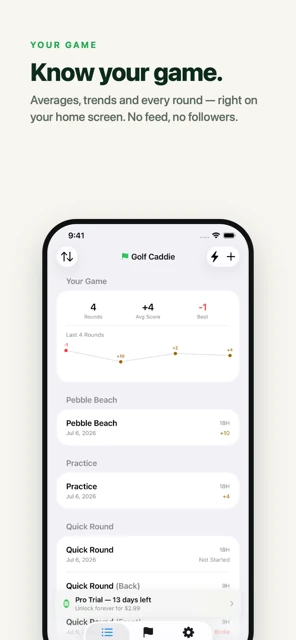
If you decide later, Pro is the same one-time $2.99 (US price), and it unlocks on your iPhone and Apple Watch together. You never need an account for any of it; see golf scorecard app with no account.
Frequently asked questions
Does Golf Caddie have ads?
No. There are no ads in the app, and its App Store privacy label says “Data Not Collected.” The free version is the full iPhone scorecard, without ads.
Will I be charged when the free trial ends?
No. The 14-day Pro trial starts inside the app and doesn’t involve an App Store purchase or a card. When it ends, Pro features lock until you buy Pro, and everything free stays free.
If I buy Pro, do I pay again for new versions?
No. Pro is a one-time purchase tied to your Apple ID. You keep it through app updates and can restore it on a new iPhone or Apple Watch with Restore Purchase in Settings.
Is the price the same in every country?
The App Store sets local prices. The US price is shown in our pricing table; other countries pay the equivalent App Store price in their currency.